

#
Python Scripting with Visual Studio Code
#
Downloading and Setting up Visual Studio Code
- Download and install the Visual Studio Code (VS Code) from https://code.visualstudio.com
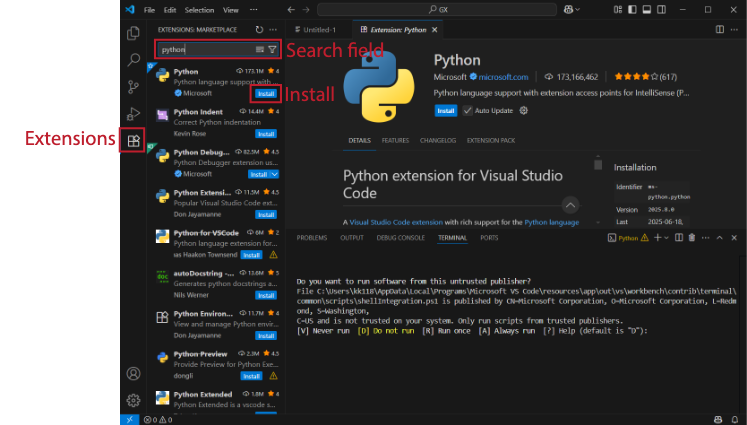
- Add Python extension if not already available. Open VS Code and click the Extensions button, then search for python and press Install as shown below.
- Close VS Code.
#
Preparing a Working Environment
This section contains the necessary steps to prepare a Python working environment using Optum’s Python Interpreter and Python Virtual Environment.
- Create an empty folder for your GX Python scripts. For example
C:\GX_Scripts. All Python scripts are to be placed in this folder (or in folders within the folder, e.g.C:\GX_Scripts\Project 1,C:\GX_Scripts\Project 2, and so on). - Open a Windows Command Prompt in the empty folder created and run the following command to setup an environment:
C:\Users\Public\OPTUM CE\OPTUM GX\python311\setup_venv.bat
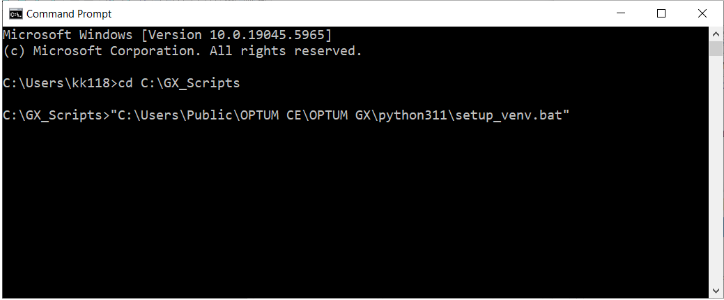
This will create a .venv folder inside the GX scripts folder. This should never be deleted or modified manually.
#
First Script
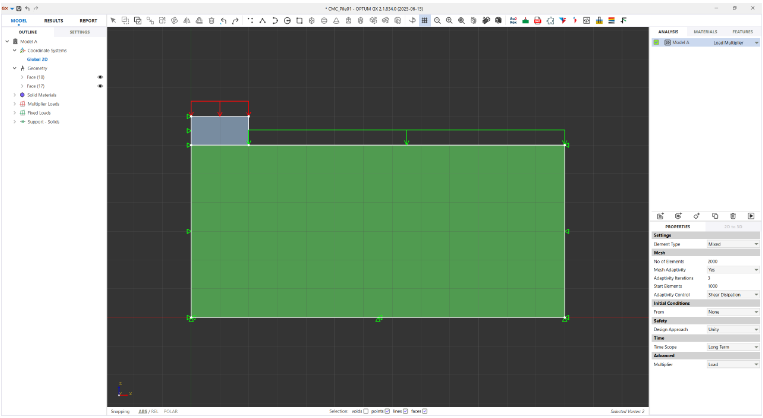
You should now be up and running and can use VS Code for GX scripting. The script shown below calculates the foundation capacity for the problem shown in Figure 3.1.
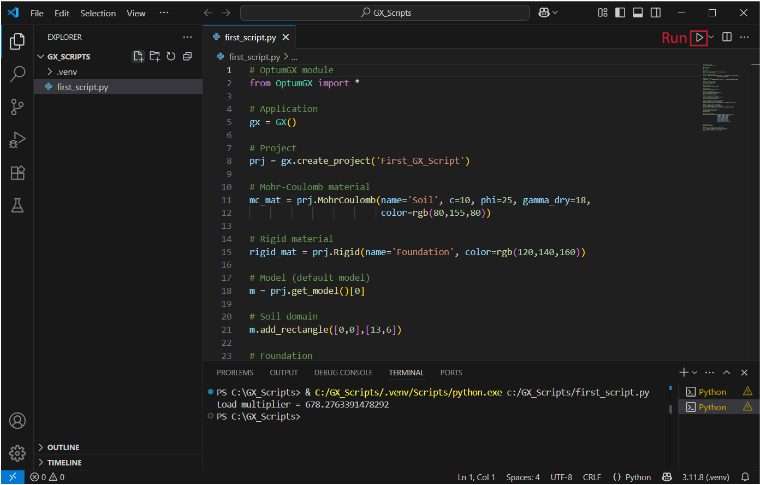
The full code is listed below.
# OptumGX module
from OptumGX import *

# Application
gx = GX()

# Project
prj = gx.create_project('First_GX_Script')

# Mohr-Coulomb material
mc_mat = prj.MohrCoulomb(name='Soil', c=10, phi=25, gamma_dry=18,
color=rgb(80,155,80))

# Rigid material
rigid_mat = prj.Rigid(name='Foundation', color=rgb(120,140,160))

# Model (default model)
m = prj.get_model()[0]

# Soil domain
m.add_rectangle([0,0],[13,6])

# Foundation
m.add_rectangle([0,6],[2,7])

# Apply soil material
sel = m.select([5,3],types='face')
m.set_solid(sel,mc_mat)

# Apply foundation material
sel = m.select([1,6.5],types='face')
m.set_solid(sel,rigid_mat)

# Apply multiplier load to foundation
sel = m.select([1,7],types='edge')
m.set_surface_load(sel,-1,direction='y',option='multiplier')

# Apply fixed load as surcharge
sel = m.select([3,6],types='edge')
m.set_surface_load(sel,-10,direction='y',option='fixed')

# Standard fixities & zoom all
m.set_standard_fixities()
m.zoom_all()

# Analysis settings
m.set_analysis_properties(analysis_type='load_multiplier',
element_type='mixed',
no_of_elements=2000,
mesh_adaptivity=True,
start_elements=1000,
adaptivity_iterations=3)

# Run analysis
prj.run_analysis()

# Extract and display load multiplier
LM = m.output.global_results.load_multiplier
print('Load multiplier = '+str(LM))